As an Amazon Associate, we earn from qualifying purchases. Some links on this site are affiliate links at no extra cost to you. Our recommendations are based on thorough research and editorial judgment.

10 Best Audio Interfaces for Your Home Studio: Elevate Your Sound Quality Today

Ready to elevate your sound quality? Check out these top audio interfaces for your home studio! The PreSonus AudioBox Go is perfect for beginners, offering a compact 2×2 setup. For podcasters, the Focusrite Vocaster One delivers impressive mic input gain. If you’re on a budget, the M-Audio M-Track Duo offers phantom power and zero-latency monitoring. Each option suits different needs, ensuring you’ll find the right fit. Stick around to explore more options that’ll boost your audio game! 🎤
Key Takeaways
- Look for audio interfaces with at least 24-bit/96 kHz recording capabilities to ensure high sound quality for home studios.
- Choose interfaces with multiple inputs/outputs (like 2×2 or 4×4) for versatile recording options and future expansion.
- Prioritize models with low-latency monitoring features to enhance the recording experience and minimize delays.
- Ensure compatibility with popular DAWs and bundled software to streamline your production workflow.
- Consider compact designs for easy transport and setup in various home studio environments.
PreSonus AudioBox Go Creator Studio Recording Bundle
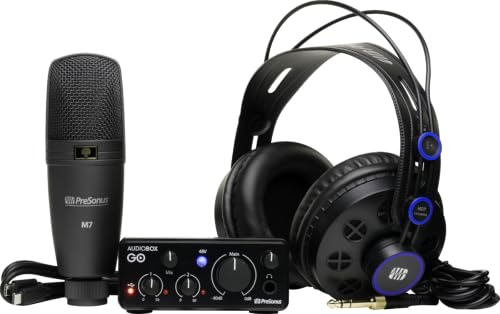
PreSonus AudioBox Go Creator Complete Studio Bundle
- PreSonus AudioBox GO USB Audio Interface – Surprisingly powerful ultra-compact audio interface for portable music performance and production.
- Recording software included: Studio One 6 Artist Edition
- PreSonus M7 Microphone – Versatile cardioid condenser microphone with mic stand adapter and windscreen.

Key Features
- 2×2 USB-C Audio Interface: Offers one mic/line combo input and one TS instrument input.
- Condenser Microphone (PreSonus M7): Comes with a mic stand adapter and a 10-foot XLR cable.
- Professional Monitoring Headphones (PreSonus HD7): Ergonomic design guarantees comfort during long sessions.
You may be interested



With Studio One 6 Artist Edition included, you’ll be ready to mix and master like a pro!
Best For: Beginners and traveling musicians looking for a compact and affordable recording solution with quality components.
Pros:
- Compact size makes it easy to transport for on-the-go recording.
- Clear preamps provide excellent audio quality for vocals and instruments.
- The independent headphone volume knob allows for personalized monitoring levels.
Cons:
- Maximum gain of 50 dB may not be sufficient for some dynamic microphones.
- Installation process for the software bundle can be lengthy and complex.
- Limited expansion options may not suit more advanced users in need of additional features.
PreSonus AudioBox USB 96 Studio with Studio One Pro Software
Sale

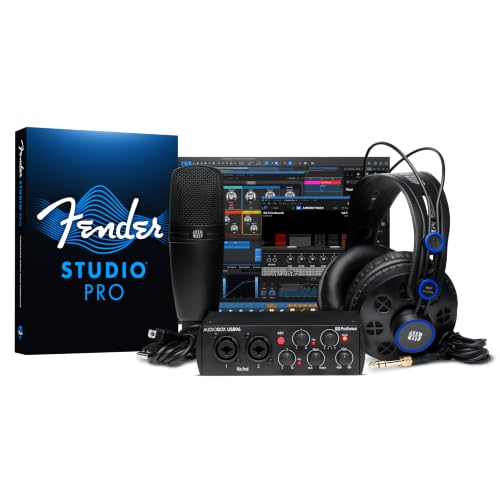
PreSonus AudioBox USB 96 25th Anniversary Studio Recording Package
- Everything you need to record and produce at home in a single purchase.
- Rugged AudioBox USB 96 audio/MIDI interface for recording vocals and instruments.
- Versatile M7 large-diaphragm condenser microphone; ideal for vocals, acoustic instruments, and more.
If you’re looking to plunge into home recording and want an all-in-one solution, the PreSonus AudioBox USB 96 Studio is a fantastic choice! 🎤 This compact package has everything you need to get started, including a rugged audio/MIDI interface that makes capturing high-quality sound a breeze.
What’s Inside?
- Audio Interface: The AudioBox USB 96 is durable and easy to use for both vocals and instruments.
- Microphone: The versatile M7 large-diaphragm condenser mic captures your voice beautifully.
- Headphones: HD7 headphones guarantee you mix and monitor without disturbing anyone.
- Software: With Studio One Artist and Studio Magic, you’re set for creative success!
Best For: Musicians and home recording enthusiasts looking for an all-in-one solution to start producing high-quality audio.
Pros:
- Comprehensive Package: Includes everything needed for home recording, from the audio interface to professional software.
- High-Quality Components: The M7 condenser microphone and HD7 headphones ensure excellent sound capture and monitoring.
- User-Friendly: The rugged design and straightforward setup make it accessible for beginners.
Cons:
- Limited Advanced Features: May not satisfy professional users seeking more advanced recording capabilities.
- Software Learning Curve: Studio One Artist might have a learning curve for those new to digital audio workstations.
- No Built-in Effects: Lacks built-in effects processing, requiring additional software or hardware for effects.
Focusrite Vocaster One Podcasting Interface
Sale

Focusrite Vocaster One — Podcasting Interface for Recording as a Solo Creator. Use Auto Gain...
- Broadcast quality sound – Get studio sound in seconds from Vocaster’s premium mic input
- Over 70dB of gain – Get the best out of any mic, no booster needed
- Auto Gain – Set your level in seconds, just push the button, start talking, and let Auto Gain do the rest
The Focusrite Vocaster One Podcasting Interface is your go-to choice if you’re a solo podcaster seeking professional-quality sound without the hassle! This compact interface offers broadcast-quality audio, ensuring your voice shines.
Audio Quality Features
- High-Quality Mic Input: Delivers studio sound in seconds.
- Over 70dB Gain: Ideal mic performance without a booster.
- Enhance Feature: Four presets to boost voice quality.
Convenient Controls
- Auto Gain: Push a button, and you’re ready to talk!
- Mute Button: Say goodbye to unwanted coughs!
Connectivity Options
- Phone Connection: TRRS cable captures conversations.
- Camera Connection: TRS cable sends high-quality audio directly to your camera.
Streaming Capabilities
– Stereo Loopback: Perfect for intros, outros, and music during shows! 🎙
Best For: Solo podcasters seeking a compact, professional-quality audio interface that simplifies the recording process.
Pros:
- High-quality audio with built-in mic preamp ensures studio-level sound.
- User-friendly features like Auto Gain and Mute button make recording hassle-free.
- Versatile connectivity options allow for easy integration with phones and cameras.
Cons:
- Limited to solo creators, which may not suit those needing multi-mic support.
- No built-in effects for advanced audio processing during recording.
- Requires a computer for power, reducing portability compared to battery-operated options.
M-Audio M-Track Duo USB Audio Interface for Recording and Streaming

M-AUDIO M-Track Duo USB Audio Interface for Recording, Streaming and Podcasting with Dual XLR, Line...
- Podcast, Record, Live Stream, This Portable Audio Interface Covers it All - USB sound card for Mac or PC delivers 48kHz audio resolution for pristine recording every time
- Be ready for anything with this versatile M-AUDIO interface - Record guitar, vocals or line input signals with two combo XLR / Line / Instrument Inputs with phantom power
- Everything you Demand from an Audio Interface for Fuss-Free Monitoring - 1/4" headphone output and stereo 1/4" outputs for total monitoring flexibility; USB/Direct switch...
Looking for a compact yet powerful audio interface that won’t break the bank? The M-Audio M-Track Duo might be your perfect match! Weighing just 12.7 ounces, it’s portable, making it ideal for recording and streaming on the go.
Key Features:
- Inputs: Dual combo XLR/Line/DI inputs with phantom power for condenser mics.
- Audio Resolution: 48 kHz for clear sound.
- Direct Monitoring: Zero-latency monitoring with a USB/Direct switch.
- Software Suite: Includes MPC Beats, compatible with many tools.
With a user-friendly plug-and-play setup, you’ll be recording in no time! 🎤
Best For: The M-Audio M-Track Duo is best for musicians, podcasters, and streamers seeking a budget-friendly, portable audio interface with versatile input options.
Pros:
- Versatile Inputs: Equipped with dual combo XLR/Line/DI inputs, making it suitable for various recording sources.
- User-Friendly: Easy plug-and-play setup allows for quick and hassle-free recording.
- Compact and Portable: Lightweight design ensures easy transport for on-the-go recording or streaming.
Cons:
- Gain Adjustment: Some users may need to fiddle with gain settings for optimal sound quality.
- Adapter Requirement: Users might require additional adapters for different output types.
- Software Compatibility: Potential issues with software compatibility on older PCs could hinder performance.
XTUGA USB Audio Interface for PC

XTUGA USB Audio Interface for PC,Interface for Recording Music Computer Recording Audio Interface...
- [Reliable Dual Inputs for Daily Use] This Q-12 audio interface provides professional 16-Bit/48kHz resolution for pristine sound. Unlike others with popping noise, our...
- [48V Phantom Power & Zero Latency] Capable of driving condenser mics with switchable 48V power. Say goodbye to high latency; this xlr interface features fast transmission...
- [Plug and Play] Functioning as a stable audio interface for PC via USB connection. Powered directly from your computer, no external adapter needed. Simply plug in and...
When it comes to recording music at home, the XTUGA USB Audio Interface for PC stands out as an excellent choice for both beginners and seasoned pros. This plug-and-play interface offers ultra-low latency, making your recording sessions smooth and efficient!
Key Features:
- Microphone Preamp: Connect your mic with a standard 3-pin XLR socket or a 3.5mm jack.
- Phantom Power: Supports 48V for powered microphones—perfect for studio-quality vocals!
- High-Performance Converter: Record and mix in 16-bit/48 kHz quality.
- Volume Control: Each channel has independent volume adjustments, plus a gain halo meter to monitor levels.
With its ultra-low noise design, the XTUGA is ideal for guitar, bass, and vocals! 🎤
Best For: The XTUGA USB Audio Interface is best for musicians and recording enthusiasts seeking an affordable, high-quality solution for home recording.
Pros:
- Plug-and-play functionality makes setup quick and easy for users of all experience levels.
- Supports phantom power for professional-grade microphones, enhancing vocal recording quality.
- Independent volume control and gain monitoring allow for precise adjustments during recording sessions.
Cons:
- Limited to 16-bit/48 kHz recording quality, which may not meet the needs of advanced users looking for higher specifications.
- The gain halo meter may not provide sufficient detail for critical level monitoring in professional environments.
- The build quality may not be as robust as higher-end audio interfaces, potentially affecting longevity with heavy use.
PreSonus Studio 24c USB Audio Interface

PreSonus Studio 24c 2x2, 192 kHz, USB Audio Interface with Studio One DAW Recording Software
- Simultaneous I/O up to 2 inputs/2 outputs
- 2 mic/instrument/line inputs with XMAX-L mic preamps
- 2 balanced ¼-inch TRS main outputs to connect professional studio monitors
For anyone diving into home recording, the PreSonus Studio 24c USB audio interface is a fantastic choice! 🎤 With its impressive 192 kHz sample rate, you’ll capture every nuance of your sound, making your recordings shine.
Key Features:
- Inputs/Outputs: 2 inputs and 2 outputs allow simultaneous recording and playback.
- Preamps: Equipped with XMAX-L mic preamps for professional-quality audio.
- Monitoring: Features a high-power headphone output and a mixer knob for low-latency monitoring.
- LED Meters: Four ladder-style LED meters show your input and output levels.
- MIDI Connectivity: Connect your MIDI devices with ease!
Get ready to elevate your sound!
Best For: Home recording enthusiasts and musicians looking for a high-quality audio interface to enhance their sound.
Pros:
- High sample rate of up to 192 kHz for capturing detailed audio.
- XMAX-L mic preamps provide professional-quality sound for recordings.
- Low-latency monitoring with a convenient mixer knob for real-time sound adjustments.
Cons:
- Limited to 2 inputs and 2 outputs, which may not suffice for larger projects.
- Power supply may be required for certain setups, adding complexity.
- Some users may find the LED meters less intuitive for precise level monitoring.
MAONO USB Audio Interface for PC (PS22 Lite Black)
Sale

MAONO PS22 Lite USB Audio Interface for PC: Interface with XLR Input 24-bit/192kHz Routing Software...
- Capture every detail of your sound: Imagine the perfect take, every note and beat, captured as if by magic. That's the MAONO PS22 Lite audio interface—designed for the...
- For Microphone Lovers: Podcasters and Voice Actors, the PS22 Lite XLR audio interface is perfect. It can handle condenser and dynamic microphones with up to 56 dB of...
- Create Your Music with Guitar: Whether you are a musician or a guitar enthusiast, an interface for recording music gives you rich, realistic sound. Plug into the audio...
The MAONO USB Audio Interface for PC (PS22 Lite Black) is a fantastic choice for aspiring podcasters and streamers wanting to elevate their sound quality! 🎤 With its impressive 24-bit/192kHz recording capability and a dynamic range of 106dB, this interface captures audio with remarkable clarity.
Key Features:
- Microphone and Instrument Compatibility: Supports both condenser and dynamic mics, plus guitars with dedicated inputs.
- User-Friendly: Plug-and-play functionality makes setup a breeze, perfect for beginners!
- Software Integration: Works seamlessly with popular DAWs and includes ProStudio Routing Software for enhanced streaming options.
Elevate your audio game with the PS22 Lite!
Best For: Aspiring podcasters, streamers, and musicians looking for a high-quality audio interface to enhance their sound recording and broadcasting experience.
Pros:
- High Recording Quality: 24-bit/192kHz recording capability ensures clear and detailed audio.
- Versatile Compatibility: Supports both condenser and dynamic microphones, as well as instruments like guitars.
- User-Friendly Design: Plug-and-play functionality and intuitive modes make it accessible for beginners.
Cons:
- Limited Advanced Features: May lack some advanced features found in higher-end audio interfaces.
- Potential Latency Issues: Although designed for low-latency output, some users may still experience slight delays.
- Compact Size May Limit Connectivity: The compact design might restrict the number of simultaneous inputs available.
Rockville Rock-U MINI USB Computer Recording Interface
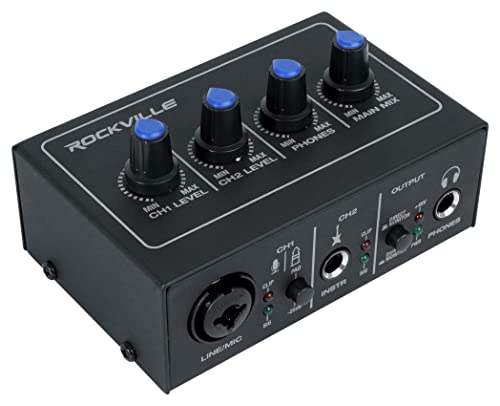
Rockville ROCK-U MINI 2x2 USB Computer Recording Interface, 24Bit/192kHz
- STUDIO-QUALITY SOUND: Premium 24-bit/192 kHz converters and low-noise preamps deliver exceptionally clean audio and ample headroom for recording vocals, instruments, and...
- VERSATILE CONNECTIVITY OPTIONS: Features XLR/1/4" combo input with 48V phantom power on channel 1, dedicated 1/4" instrument input with Hi-Z switch on channel 2, plus...
- REAL-TIME MONITORING SOLUTION: Switch between direct zero-latency monitoring for distraction-free recording and USB playback mode, with visual signal/clipping indicators...
Looking for an audio interface that packs a punch without breaking the bank? The Rockville Rock-U MINI USB Recording Interface is just what you need! With premium 24-bit/192 kHz converters and low-noise preamps, it delivers crystal-clear audio for your vocals and instruments.
Key Features:
- Inputs: XLR/1/4 combo input with 48V phantom power, plus a dedicated Hi-Z instrument input.
- Monitoring: Enjoy direct zero-latency monitoring and USB playback mode with clipping indicators.
- Portability: Its compact design (3.1 x 4.5 x 1.8) makes it perfect for mobile setups!
Get ready to elevate your recordings! 🎶
Best For: Musicians and podcasters looking for a budget-friendly, high-quality audio interface for home or mobile recording setups.
Pros:
- Exceptional Sound Quality: 24-bit/192 kHz converters and low-noise preamps ensure clear audio capture.
- Compact and Portable: Small design makes it easy to transport for on-the-go recording.
- Versatile Connectivity: Features multiple input options, including phantom power and Hi-Z input for instruments.
Cons:
- Limited Inputs: Only two channels may not be sufficient for larger recording sessions.
- No MIDI Connectivity: Lacks MIDI input/output, which may be a drawback for some users.
- Basic Monitoring Features: While it offers zero-latency monitoring, advanced users may find the features limited.
PreSonus Studio 24c USB Audio/MIDI Interface with CR3.5 Monitors

PreSonus Studio 24c Recording Studio Bundle with Mackie CR4-X Monitors, Condenser Microphone...
- PRESONUS STUDIO 24C USB-C INTERFACE WITH 24-BIT/192 KHZ RECORDING & DUAL XMAX-L PREAMPS : The Studio 24c delivers ultra-clear sound with high-resolution 24-bit/192kHz...
- MACKIE CR4-X PROFESSIONAL 4″ POWERED STUDIO MONITORS FOR ACCURATE MIXING : Includes a pair of CR4-X monitors featuring 4″ polypropylene woofers, 0.75″ silk-dome...
- CONDENSER MICROPHONE WITH SHOCKMOUNT, POP FILTER & ISOLATION SHIELD : Capture crisp, detailed vocals using the large-diaphragm condenser mic designed for clean frequency...
If you’re ready to elevate your home studio game, the PreSonus Studio 24c USB Audio/MIDI Interface paired with CR3.5 Monitors is a fantastic choice! This USB-C interface packs a punch with 24-bit resolution and sampling rates up to 192kHz, ensuring your sound is crystal clear.
Key Features:
- Inputs: 2 mic/instrument/line inputs with XMAX-L preamps.
- Phantom Power: +48V globally for your condenser mics.
- Outputs: 2 balanced 1/4 TRS outputs with front-panel control.
With the included Studio One Artist software, you’ll have everything you need to mix and record like a pro. 🎶
Best For: Musicians and audio engineers seeking a versatile and high-quality audio interface for recording and mixing.
Pros:
- High-quality audio: 24-bit resolution and support for sampling rates up to 192kHz ensure professional sound quality.
- Versatile inputs: Equipped with 2 mic/instrument/line inputs featuring XMAX-L preamps for various recording needs.
- Included software: Comes with Studio One Artist and Studio Magic Plug-in Suite for a complete recording experience.
Cons:
- Limited outputs: Only 2 main outputs may not suffice for larger setups or multiple monitoring options.
- USB-C only: Users with older USB connections may need an adapter for compatibility.
- No MIDI in/out: Lacks dedicated MIDI ports, which may be a drawback for users with MIDI gear.
Universal Audio Volt 176 USB Recording Studio Audio Interface
Sale


Universal Audio Volt 176 USB Audio Interface
- Enjoy the rich, album-ready sound of classic UA 610 preamps with Vintage mode
- Add clarity and punch to vocals, instruments, and more with an analog compressor based on the renowned 1176
- Record and mix with the award-winning LUNA Digital Audio Workstation, giving you the sound and workflow of a real analog studio
For aspiring musicians and seasoned producers alike, the Universal Audio Volt 176 USB Recording Studio Audio Interface stands out as a premium choice! 🎶 With its impressive 24-bit/192 kHz recording quality, you’ll capture every nuance of your sound, whether you’re laying down tracks in your home studio or streaming live.
Key Features:
- Type: 1-in / 2-out USB audio interface
- Compatibility: Mac, PC, iPad, iPhone
- Built-in Compressor: Adjust settings for clarity
- Preamps: Classic UA 610 for rich sound
- Included Software: LUNA DAW and UAD plug-ins
With a compact design, it’s perfect for any setup!
Best For: Musicians and producers seeking a high-quality, versatile audio interface for recording, streaming, and podcasting.
Pros:
- Excellent Sound Quality: Offers up to 24-bit/192 kHz recording, ensuring detailed audio capture.
- User-Friendly: Plug-and-play setup makes it accessible for beginners and advanced users alike.
- Built-in Compressor: Features an adjustable compressor for enhanced vocal clarity and vintage sound.
Cons:
- Manual Phantom Power Activation: Requires manual activation after power loss, which can be inconvenient.
- Limited Audio Meters: Provides less visual feedback compared to professional needs.
- Weight: At 1.44 pounds, it may not be the most portable option for all users.
Factors to Consider When Choosing an Audio Interface for a Home Studio
When you’re choosing an audio interface for your home studio, there are a few key factors to keep in mind. You want to take into account audio quality requirements, input and output configurations, and software compatibility, among others. Plus, don’t forget about portability and power supply options—your perfect setup is just a few decisions away! 🎶
Audio Quality Requirements
Choosing the right audio interface for your home studio can feel like maneuvering through a maze, but it’s vital for achieving superior sound quality! 🎶 To start, you’ll want to prioritize high-resolution recording capabilities—look for interfaces that support at least 24-bit/96 kHz. This guarantees your recordings capture every detail!
Next, quality preamps are important. Aim for at least 50 dB of gain to get the best performance from your microphones, without needing external boosters.
Don’t forget about direct monitoring features! They offer zero-latency, so you won’t hear any annoying delays while recording. Finally, verify the interface is compatible with various DAWs to integrate smoothly into your setup. Happy recording! 🥳
Input/Output Configuration
As you set up your home studio, the input/output (I/O) configuration of your audio interface plays a pivotal role in how you capture and playback sound. If you’re into multi-track recording, look for a 4×4 configuration or higher. A 2×2 setup works well for simple projects, like recording a vocal and an instrument simultaneously. Mic/line combo inputs are fantastic for versatility, letting you plug in different mics or instruments on the same channel. Don’t forget dedicated headphone outputs with independent volume controls—these help you monitor without messing with the main output! Plus, MIDI I/O is a game-changer for integrating electronic instruments, expanding your studio’s capabilities. Choose wisely, and elevate your sound! 🎤🎶
Software Compatibility
Selecting the right audio interface can make or break your home studio experience, so it’s essential to take into account software compatibility. Start by ensuring your interface works with your favorite digital audio workstation (DAW), like Pro Tools or Ableton Live. Next, check for drivers that support both macOS and Windows—nobody wants a tech headache!
Look for low-latency output using ASIO drivers; it’s vital for real-time recording without frustrating delays. Some interfaces even come with bundled software, so make sure it fits your production needs. Finally, confirm that the interface supports the sample rates and bit depths required for your projects. After all, great sound starts with the right gear! 🎶
Portability and Size
When it comes to setting up your home studio, portability and size often play a crucial role in your audio interface choice. You’ll want a compact design that easily fits in tight spaces or your travel bag. Look for interfaces that weigh less than a few pounds—no one wants to lug around extra bulk! USB bus-powered options are fantastic, too, as they eliminate the need for an external power supply. Plus, plug-and-play interfaces make setup a breeze. A sturdy build quality is essential, ensuring your interface can handle the bumps and bruises of frequent transport. So, whether you’re recording at home or on the go, keep portability in mind to elevate your sound experience! 🎶
Power Supply Options
Don’t forget phantom power (+48V) if you plan to use condenser microphones. Always check the power requirements of your devices, as some microphones and instruments may need specific sources for peak performance. With the right power supply option, you’ll guarantee your audio gear shines in every session! 🌟
Budget Considerations
Budgeting for an audio interface can feel like steering through a maze, but it doesn’t have to be overwhelming! Start by setting a budget, as prices can range from under $100 for basic models to over $500 for professional-grade options. Remember, investing a little more often means better sound quality, extra connectivity, and durability.
If you’re just starting, numerous budget interfaces offer essential features like 24-bit/48 kHz recording. Plus, don’t forget to factor in the included software; some come with professional DAWs and plugins, adding value to your purchase! To future-proof your choice, consider slightly higher-end models that support advanced features, so you won’t have to navigate the maze again anytime soon! 🎶
Frequently Asked Questions
What Is the Difference Between USB and Thunderbolt Audio Interfaces?
When you’re choosing between USB and Thunderbolt audio interfaces, it’s all about speed and performance! USB interfaces are super common and generally affordable, with decent speeds up to 480 Mbps. Thunderbolt, on the other hand, can handle data up to 40 Gbps, making it ideal for high-track counts and low latency. If you want to future-proof your setup, you might lean toward Thunderbolt, but USB’s still a solid choice for most! 🎶
How Do I Connect My Audio Interface to a DAW?
Connecting your audio interface to a DAW is as easy as pie! First, plug in your interface via USB or Thunderbolt. Then, fire up your DAW and head to the audio settings. Select your interface from the list—voilà! 🎉 You’re ready to rock! If you’re using multiple inputs, set them up in the DAW’s mixer. Don’t forget to adjust the input levels, so your sound isn’t too shy or too loud! 🎶
Can I Use an Audio Interface With a Laptop?
Absolutely, you can use an audio interface with your laptop! Most interfaces connect via USB, making it super easy. Just plug it in, and your laptop should recognize it. You’ll want to check compatibility with your DAW too. Look for features like low-latency performance and high-quality preamps. 🎶 Whether you’re recording vocals or instruments, an interface can drastically improve your sound. So, get ready to level up your audio game! 🎉
What Sample Rate and Bit Depth Should I Choose?
When choosing a sample rate and bit depth, you can’t go wrong with 44.1 kHz and 24-bit. This combo gives you great sound quality without hogging too much storage space! If you’re feeling fancy, try 96 kHz for even better detail, but keep in mind it’ll use more resources. Remember, higher isn’t always better; it’s about what fits your project! 🎶 So, pick wisely, and happy recording!
How Do I Troubleshoot Common Audio Interface Issues?
Troubleshooting audio interface issues can feel like a puzzle, but you got this! Start by checking your connections—loose cables can cause headaches. Next, verify your drivers are up to date; outdated software may lead to glitches. If you’re hearing pops or clicks, try adjusting your buffer size in your DAW settings. Finally, reboot your computer; it’s a classic fix! 🎧 Keep calm and keep recording—smooth sound awaits!


