As an Amazon Associate, we earn from qualifying purchases. Some links on this site are affiliate links at no extra cost to you. Our recommendations are based on thorough research and editorial judgment.


5 Best Audio Interfaces With Low Latency for Flawless Recording

Looking for the best audio interfaces with low latency? You’re in luck! Check out the PreSonus AudioBox 96—24-bit/96 kHz for crisp sound. The MOTU M4 rocks a high-quality LCD display and USB-C power! If you need more, the Behringer UMC404HD offers four Midas-designed preamps. PreSonus AudioBox GO is compact and perfect for on-the-go. Finally, the Synido Solo interfaces well with various devices! Keep reading to discover what makes these the ideal choices for flawless recording! 🎤✨
Key Takeaways
- Look for audio interfaces like the MOTU M4 that achieve very low latency, ideally under 10 milliseconds for optimal performance.
- Consider PreSonus AudioBox 96 and Go for their excellent audio resolution up to 24-bit/96 kHz, which enhances sound quality.
- Choose interfaces with multiple input options, including XLR and 1/4-inch, for versatile recording setups, like the Behringer UMC404HD.
- Ensure the interface supports direct monitoring features to reduce latency and provide real-time feedback during recording sessions.
- Prioritize portable and robust designs, such as the Synido Solo, for ease of transport and durability during on-the-go recordings.
PreSonus AudioBox 96 USB Audio Interface with Studio One Artist DAW
Sale


PreSonus AudioBox 96 25th Anniversary USB Audio Interface
- Value-packed 2-channel USB 2.0 interface for personal and portable recording.
- 2 high-quality Class-A mic preamps make it easy to get a great sound.
- 2 high-headroom instrument inputs to record guitar, bass, and your favorite line-level devices, plus MIDI I/O.

You may be interested



If you’re a budding musician or a podcasting enthusiast, the PreSonus AudioBox 96 USB Audio Interface is your ticket to high-quality recording without breaking the bank. 🎤 With its two Class-A mic preamps and instrument inputs, this interface is perfect for capturing everything from soulful vocals to electric guitar riffs.
Key Features
- High-quality Recording: Supports up to 24-bit/96 kHz resolution.
- Versatile Connections: Two mic preamps, high-headroom instrument inputs, MIDI I/O.
- Mix Control: Enables zero-latency monitoring for real-time feedback.
With a robust steel chassis, it’s built for travel. Plus, it includes Studio One Artist DAW—ideal for both beginners and pros! 📀
Best For: Budding musicians and podcasting enthusiasts looking for an affordable, high-quality recording solution.
Pros:
- High-quality Recording: Supports up to 24-bit/96 kHz resolution for crisp audio fidelity.
- Versatile Connections: Features two mic preamps, high-headroom instrument inputs, and MIDI I/O for varied recording methods.
- User-friendly Software: Comes with Studio One Artist DAW, making it accessible for both beginners and experienced producers.
Cons:
- Limited Channels: Only offers two input channels, which may not suffice for larger recording sessions.
- Basic MIDI Functionality: Some users may find the MIDI capabilities limited compared to dedicated MIDI interfaces.
- No Included Headphones: While it works well with headphones, it does not come with a set, which might be an added expense for beginners.
MOTU M4 4×4 USB-C Audio Interface
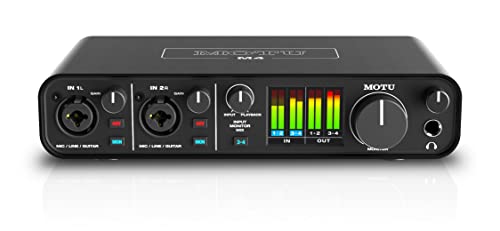
MOTU M4 4x4 USB-C Audio Interface
- 4-in/4-out USB-C Audio Interface with 2 Microphone Preamps
- 6+GB of Free Content - Mac/PC/iOS
- Hardware Moniting
The MOTU M4 4×4 USB-C Audio Interface is perfect for musicians and producers who demand exceptional sound quality without the hassle of complicated setups. 🎶 With its superior audio reproduction and user-friendly design, you’ll feel right at home whether you’re recording vocals, instruments, or even streaming live.
Key Features
- Ports: 4 inputs and 4 outputs, featuring 2 mic preamps.
- Display: High-quality LCD for clear sound level visuals.
- Latency: Very low, ideal for real-time processing.
- Power: USB-C powered, no extra power cable needed.
With a solid build and intuitive controls, you’ll wonder how you ever recorded without it!
Best For: Musicians, producers, and streamers seeking high-quality audio without complicated setups.
Pros:
- Superior sound quality for both input and output.
- User-friendly design with intuitive controls, making it perfect for beginners.
- Low latency performance, suitable for real-time audio processing.
Cons:
- Some users have reported clock sync errors leading to pitch shifting on Windows.
- Limited to USB-C connectivity, which may require adapters for older devices.
- No built-in effects, which may necessitate external processing or software for enhanced sound options.
Behringer U-Phoria UMC404HD USB Audio Interface

Behringer UMC404HD Audiophile 4x4, 24-Bit/192 Khz USB Audio/MIDI Interface with Midas Mic...
- USB 2.0 Audio Interface with 4 Preamps MIDI I/O - macOS/Windows
- 24-bit/192kHz
- 4-in/4-out
Looking for an audio interface that combines versatility and affordability? The Behringer U-Phoria UMC404HD is a fantastic choice! With four Midas-designed mic preamps and 24-bit/192 kHz audio quality, you’ll capture every note with crystal clarity. It features 4 inputs and 4 outputs, plus handy MIDI I/O for your vintage gear. Weighing just 2.65 pounds, it’s easily transportable!
Set up is a breeze; it’s compatible with both macOS and Windows, fitting seamlessly with popular DAWs like Pro Tools. Users rave about its performance and low noise floor—perfect for vocals, instruments, or podcasts. Time to elevate your recording game! 🎤
Best For: Beginners and experienced musicians looking for a reliable and affordable audio interface for home studio recording.
Pros:
- High-quality audio with 24-bit/192 kHz resolution ensures clarity in recordings.
- Versatile connectivity with 4 Midas-designed mic preamps and MIDI I/O for various audio devices.
- User-friendly setup compatible with both macOS and Windows, making it easy to integrate with DAWs.
Cons:
- Potential driver issues on reboot for some users, causing reconnection problems.
- Slight play in knobs noted by some users, which may affect long-term durability.
- Limited advanced features compared to higher-end audio interfaces, which may not satisfy professional users.
PreSonus AudioBox GO USB-C Audio Interface for Music Production

PreSonus AudioBox GO | USB-C Audio Interface for music production with Studio One DAW Recording...
- Ultra-affordable: ultra-compact, versatile USB-C audio interface for home and mobile recording with professional sound quality.
- Recording Software included: Get started right away with Studio One Prime DAW recording software and Studio Magic software bundle including music tutorials, tons of sound...
- Bus-Powered: AudioBox GO is powered by your connected USB-C device so no need for an additional power supply – works great with both Apple and Android devices.
For those diving into music production, the PreSonus AudioBox GO USB-C Audio Interface is a game-changer! This ultra-affordable, compact device packs a punch with professional sound quality.
Key Features
- Power and Connectivity: It’s bus-powered via USB-C, so you skip the extra power supply! Compatible with Apple and Android devices, it’s perfect for mobile recording.
- Input and Output: You get 1 TS instrument input and 1 XLR mic/line combo input, plus a TRS 1/4” headphone output for zero-latency monitoring.
- Audio Quality: With support for up to 24-bit/96 kHz, your recordings will shine!🎶
Ready to elevate your sound?
Best For: Musicians and music producers looking for an affordable and portable audio interface for high-quality recording on the go.
Pros:
- Compact Design: Extremely portable and easy to carry, making it ideal for mobile recording sessions.
- Affordable Price: Offers professional features without breaking the bank, perfect for beginners and budget-conscious users.
- Compatibility: Works seamlessly with both Apple and Android devices, enhancing usability across different platforms.
Cons:
- Limited Inputs: Only one mic input and one instrument input, which may not suffice for larger recording setups.
- Basic Software Bundle: The included software may lack advanced features needed by more experienced users.
- No MIDI Input: Lacks MIDI functionality, limiting its use for users who need to connect MIDI instruments.
Solo USB C Audio Interface for Recording Music

Synido USB C Audio Interface for Recording Music, Streaming, Podcasting with XLR, Line Input...
- ✔️[High-fidelity sound quality, accurate sampling] The Synido Solo 2x2 audio interface uses a high-quality independent audio chip to reduce recording latency, support...
- ✔️[Three monitoring modes, easy to switch] The audio interface provides three monitoring modes to meet different needs. In Stereo mode, independent left and right...
- ✔️[User-friendly design] The audio interface is intuitively designed, and equipped with three independent control areas, and the XLR interface supports 6.35mm and XLR...
Key Features:
The Synido Solo USB C Audio Interface is fantastic for recording music, streaming, and podcasting! With 24-bit depth and a 48kHz sampling rate, your audio will sound crystal clear. It has inputs for XLR and line instruments, plus professional 48V phantom power for dynamic mics. The compact design (14 x 11.5 x 4.5 cm) and lightweight construction (only 300g) make it super portable. You’ll love the three monitoring modes—Stereo, Mix, and USB. It’s compatible with any DAW on various devices, ensuring an easy setup! Ultimately, it’s a terrific starter option for budget-conscious creators! 🎤✨
Best For: The Synido Solo USB C Audio Interface is best for budget-conscious content creators looking for a portable and easy-to-use device for recording music, streaming, and podcasting.
Pros:
- High-fidelity sound quality with low latency for clear recordings.
- Lightweight and portable design, making it ideal for travel.
- Compatible with various devices and any Digital Audio Workstation (DAW) for seamless integration.
Cons:
- Some users report audio drops and pops during use.
- Limited input sensitivity may require careful adjustment for optimal performance.
- Lack of individual volume control for outputs may affect flexibility in monitoring.
Factors to Consider When Choosing an Audio Interface With Delay
When choosing an audio interface, you need to keep several factors in mind, especially latency performance. You’ll want to assess input and output options, sound quality, and even how portable the unit is! Plus, let’s not forget software compatibility—finding the right match can make all the difference in your recording journey! 🎶
Latency Performance Requirements
Choosing the right audio interface involves more than just picking the flashiest model on the market; it’s all about latency performance! 🎧 Latency—the delay between input and output—can seriously affect your recording game. Aim for an interface with latency under 10 milliseconds for real-time monitoring and smoother recordings.
Input and Output Options
Now that you’re aware of how latency impacts your recording experience, let’s talk about the input and output options that can elevate your setup to the next level. Choose an audio interface with multiple inputs, like XLR combo inputs for mics and 1/4-inch inputs for instruments. 🥁 If you’re into MIDI, make certain it has MIDI I/O for easy connections with synthesizers. Also, check how many outputs it offers; having multiple can help you monitor through headphones and studio monitors at the same time! 🎧 Don’t forget about direct monitoring capabilities to cut down on latency and enjoy real-time feedback. Finally, confirm compatibility with balanced TRS outputs for pro setups and unbalanced outputs for simpler needs!
Sound Quality Specifications
Understanding sound quality specifications is essential for your recording setup! When choosing an audio interface, consider the bit depth and sample rate. Aim for a 24-bit depth and 96 kHz sample rate, which capture rich, dynamic audio. Next, look for high-quality converters—they’re like the secret sauce for clarity and fidelity in your recordings.
Low-noise preamps are vital, especially when you’re recording quiet sounds, as they keep unwanted background noise at bay. Plus, direct monitoring lets you hear yourself in real-time, bypassing any latency that’s a performance killer. Finally, compatibility with your software and hardware matters! Make sure everything gels together for the best sound quality experience. Happy recording! 🎶
Portability and Build Quality
How important is portability when you’re choosing an audio interface? Extremely! If you’re constantly on the move, compact, lightweight gear is your best friend. Many audio interfaces weigh between 1 to 2.5 pounds, allowing you to pack them easily. Plus, look for USB bus-powered models—no external power supply means hassle-free recording anywhere!
Build quality matters, too. A sturdy chassis made of steel can handle travel’s bumps and bruises. A compact design, around 5.5 x 5.5 x 1.75 inches, helps with setups in tight spots. Think of it as your musical Swiss Army knife! So, whether you’re in a studio or a coffee shop, choose an interface that travels as well as you do. 🎤✈
Software Compatibility and Features
When you’re selecting an audio interface, the importance of software compatibility and features can’t be overstated. Make sure it works smoothly with your favorite Digital Audio Workstation (DAW) on macOS and Windows. This integration keeps your creativity flowing!
Check if the interface includes bundled software like recording software and virtual instruments—these extras can boost your production right away!
Low-latency monitoring is key—I mean, who wants delays? Features like mix control and direct monitoring can reduce perceived delay during live sessions. Finally, keep an eye on audio quality specs, such as bit depth and sampling rate; higher settings enhance performance with various software. You want to hit all the right notes—without the lag! 🎶
Price Versus Functionality
Choosing an audio interface might feel like decoding a complex riddle, but it doesn’t have to be! Let’s break it down.
Entry-Level ($100-$200)
These interfaces offer basic preamps and limited I/O options—perfect for beginners.
Mid-Range ($200-$500)
Looking for enhanced audio quality? Mid-range options provide more inputs/outputs and nifty features like MIDI I/O.
High-End ($500+)
Need professional-grade sound? High-end devices deliver superior quality, lower latency, and extensive connectivity.
Don’t forget to balance your budget with the functionality you need! Investing in multiple channels or better audio converters can elevate your sound considerably. So, weigh your options wisely—your future recordings deserve it! 🎶
Frequently Asked Questions
How Do I Choose the Right Cable for My Audio Interface?
Choosing the right cable for your audio interface? You’ve got a couple of great options! 🎤 For balanced connections, use XLR or TRS cables to minimize noise. Unbalanced connections? Go for TS cables, but they might pick up some hum. Make sure the length fits your space, too—too long can mean signal loss. Finally, check the cable quality; it’s worth investing in good ones for clearer sound. Happy recording! 🎶
Can I Use an Audio Interface With Multiple Devices Simultaneously?
Have you ever wondered if you can juggle multiple devices with your audio interface? Yes, you absolutely can! Many interfaces feature multiple inputs and outputs, allowing you to connect microphones, instruments, or even your computer. Just guarantee your interface has enough channels to accommodate everything. Brands like Focusrite and PreSonus provide excellent options! Mixing and recording simultaneously can really boost your creative flow! 🎶 So, go ahead and connect those devices!
What Is the Importance of Sample Rate in Recording?
The sample rate‘s key in recording! It measures how many times per second your audio’s captured, typically in hertz (Hz). Higher sample rates, like 96kHz or 192kHz, give you clearer sound by capturing more detail. However, they also require more storage space and processing power. For most, 44.1kHz (CD quality) is just fine! So, think about your project’s needs; you don’t wanna be overwhelmed by data, right? 🚀
How Can I Reduce Latency When Recording?
To reduce latency when recording, you can start by adjusting your audio buffer size. Lower values decrease latency but can increase the risk of glitches. Aim for a buffer size of 128 or lower. Also, make sure your audio drivers are up to date and switch to direct monitoring if your interface allows it. Finally, close background applications; they might be sneakily hogging your computer’s processing power! 🎧 Happy recording!
Is It Possible to Use an Audio Interface for Live Performances?
Absolutely, you can use an audio interface for live performances! 🎤 It connects your instruments to your computer or sound system, ensuring top-quality audio. With low-latency models, you get real-time feedback, essential for performing artists. Often, they come with features like MIDI support and multiple outputs, letting you customize your setup. Just remember, an interface helps your sound shine while keeping the technical hiccups at bay. Now, let’s make some magic happen! ✨