As an Amazon Associate, we earn from qualifying purchases. Some links on this site are affiliate links at no extra cost to you. Our recommendations are based on thorough research and editorial judgment.


10 Best Audio Interfaces With Volume Control for the Perfect Sound Experience

Looking for the best audio interfaces with volume control? You’ve got some stellar options! Consider the Behringer CONTROL2USB, a high-end studio control unit that connects multiple monitors. For content creators, the BEACN Mix Create shines with its 5″ display and USB-C compatibility. Gamers will love the IXTECH Audio Mixer for its adjustable effects. There’s also the XTUGA USB Interface for quality recordings. Stay tuned—there’s more to uncover about which model best fits your needs! 🎧
Key Takeaways
- Explore top audio interfaces like the Behringer CONTROL2USB for reliable volume control and multi-monitor setup options.
- The BEACN Mix Create offers advanced features, including knob paging and a full-color display for seamless audio management.
- IXTECH Gaming Audio Mixer provides multiple channels and effects, ideal for interactive streams and dynamic audio experiences.
- Check the XTUGA USB interface for effortless setup and independent volume control, perfect for home recording environments.
- HiFi RCA Passive Preamp delivers precise volume adjustments, ideal for users connecting multiple audio sources without losing sound quality.
Behringer CONTROL2USB High-End Studio Control with USB Audio Interface

Behringer XENYX CONTROL2USB High-End Studio Control and Communication Center with VCA Control and...
- Studio Monit Controller with VCA Control USB Audio Interface
- All-in-one Master Volume controller, Source selector, Monitor switcher and Talkback box
- Premium, ultra-low noise and high headroom studio control and communication center
You may be interested



Are you looking for a user-friendly audio interface with high-quality control? The Behringer CONTROL2USB is your answer! This high-end studio control unit offers an all-in-one master volume controller, source selector, and monitor switcher. Plus, it features a handy talkback box with a built-in microphone.
With ultra-low noise and high headroom, you can connect three sets of studio monitors easily. The dimensions are 7.8 x 15.31 x 3.43 inches, weighing just 5.29 pounds.
Best For: Audio professionals and home studio users seeking a versatile and cost-effective studio monitor controller with high-quality features.
Pros:
- Solid build quality with extensive features packed into a compact design.
- Versatile connectivity allows for multiple audio sources and studio monitors.
- User-friendly talkback functionality with a built-in microphone for seamless communication.
Cons:
- Large footprint may not fit well in smaller studio spaces.
- Visibility issues with the volume knob’s position can make adjustments less intuitive.
- Some users may experience a learning curve with the extensive routing options.
BEACN Mix Create Audio Interface for Content Creators
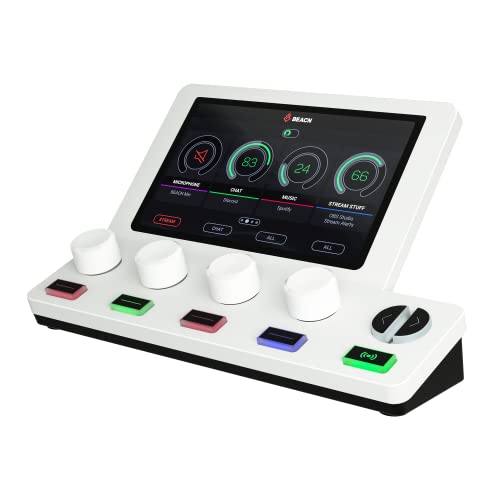
BEACN Mix Create Audio Mixer | Audio Mixer for PC & Mac | USBC for Content Creators | Gaming for...
- COMPREHENSIVE AUDIO MIXER FOR PC AND MacOS - The knob paging feature of the BEACN Mix Create audio mixer for PC provides superior control, allowing you to manage more...
- INTUITIVE DISPLAY FOR COMPLETE CONTROL - The BEACN Mix Create audio mixer features a vibrant 5” full-color display that keeps you in command of your audio at all times...
- COMPLETE YOUR COMPUTER ACCESSORIES - The Mix Create stream audio mixer is equipped with smooth push-button encoders for precise volume control and quick muting. This USB...
The BEACN Mix Create Audio Interface is a game-changer for content creators enthusiastic to elevate their streaming and podcasting experiences. 🖥 With its USB-C connectivity and compatibility with both Windows and MacOS, this sleek audio mixer puts you in the driver’s seat of your audio landscape.
Control Features
You’ll appreciate the knob paging feature which lets you manage over four audio sources effortlessly. Plus, the smooth push-button encoders allow for precise volume control and instant muting!
Display and Usability
The 5” full-color display not only looks great but helps you identify your audio setups—making it a must-have for your creative journey!
Best For: Content creators, streamers, and podcasters looking for an advanced yet user-friendly audio management solution.
Pros:
- Enhanced audio control with the ability to manage multiple audio sources seamlessly.
- Vibrant 5” full-color display for easy identification and manipulation of audio settings.
- Smooth integration with existing streaming equipment, improving overall audio quality.
Cons:
- May require an initial learning curve for users unfamiliar with advanced audio routing.
- Higher price point compared to basic audio mixers could be a deterrent for budget-conscious creators.
- Limited compatibility with some older operating systems or specific software configurations.
IXTECH Gaming Audio Mixer 4 Channel Soundboard
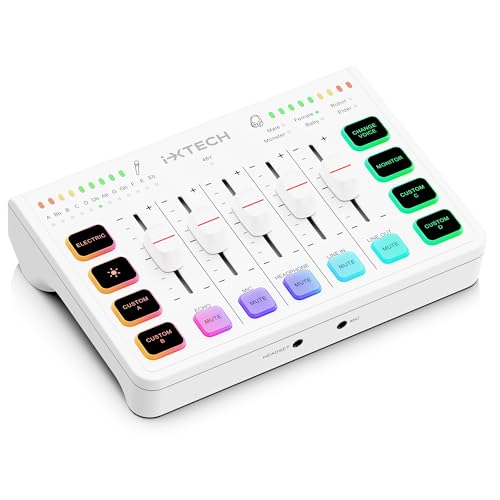
IXTECH Gaming Audio Mixer 4 Channel Soundboard, Streaming RGB PC Audio Interface with XLR Microphone...
- Line In And XLR Input Support: The gaming audio interface is compatible with dynamic microphones as well as XLR condenser microphones through the built-in 48V phantom...
- Multi Channel Audi Mixer: Our USB audio interface offers 4 channels to easily control the volume levels of your devices along with featuring mute buttons for your Mic...
- Compact With RGB Lights: This audio interface for pc uses a sleek and compact design which coupled with the adjustable RGB lighting will add an aesthetic touch to any...
If you’re diving into the world of streaming or podcasting, the IXTECH Gaming Audio Mixer 4 Channel Soundboard is tailor-made for you! 🎤 With its four channels, each featuring individual volume controls and mute buttons, you’ll have total command over your audio inputs like a pro.
Key Features:
- Inputs: Supports dynamic and XLR condenser mics with 48V phantom power.
- Audio Management: Control audio inputs and outputs independently.
- Voice Effects: Six built-in options to change your voice, from robot to baby.
- RGB Lighting: Adjustable to match your setup.
Lightweight and compact at just 14.7 ounces, it’s easy to fit on any desktop. Plus, with plug-and-play compatibility, you’re ready to stream in no time!
Best For: The IXTECH Gaming Audio Mixer 4 Channel Soundboard is best for streamers and podcasters looking for versatile audio control in a compact design.
Pros:
- Compact size and lightweight design make it easy to set up in any workspace.
- Versatile connectivity options for various microphone types enhance usability.
- Fun features like RGB lighting and a built-in voice changer add creativity to your streams or recordings.
Cons:
- Initial setup may be challenging for some users, particularly regarding headphone connections.
- Some users have reported a tinny sound quality when using basic earbuds.
- Limited adjustments may be needed to optimize sound for different setups.
XTUGA USB Audio Interface for PC

XTUGA USB Audio Interface for PC,Interface for Recording Music Computer Recording Audio Interface...
- [Reliable Dual Inputs for Daily Use] This Q-12 audio interface provides professional 16-Bit/48kHz resolution for pristine sound. Unlike others with popping noise, our...
- [48V Phantom Power & Zero Latency] Capable of driving condenser mics with switchable 48V power. Say goodbye to high latency; this xlr interface features fast transmission...
- [Plug and Play] Functioning as a stable audio interface for PC via USB connection. Powered directly from your computer, no external adapter needed. Simply plug in and...
For those diving into the world of home recording, the XTUGA USB Audio Interface for PC is a game-changer! 🎤 You’ll appreciate its ultra-low latency and plug-and-play functionality, making setup a breeze.
Input and Connectivity
You can connect a microphone using the 3-pin XLR socket or the 3.5mm jack. Plus, it supports 48V phantom-powered microphones!
Performance Features
With a high-performance converter, you’ll record in studio quality up to 16-bit/48 kHz. Independent volume control for each channel and a gain halo meter let you monitor your input levels effortlessly.
Ideal Usage
Whether you’re recording vocals, guitar, or bass, just watch the gain meter for perfect levels!
Best For: The XTUGA USB Audio Interface is best for beginners and professional musicians looking to record high-quality audio at home with ease.
Pros:
- Ultra-low latency for seamless monitoring during recording.
- Plug-and-play functionality makes it easy to set up and use with computer software.
- Supports 48V phantom power for using professional condenser microphones.
Cons:
- Limited to 16-bit/48 kHz recording quality, which may not meet the needs of professional studios requiring higher resolutions.
- Gain halo meter can be confusing for complete beginners unfamiliar with input levels.
- Only one 3-pin XLR mic input, limiting simultaneous microphone usage unless using additional adapters.
HiFi RCA Passive Preamp Stereo Audio Preamplifier with Volume Control

TENEALAY HiFi RCA Passive Preamp Stereo Audio Preamplifier with Volume Control, A/B Audio Switch...
- FV2 is a stereo RCA audio switch box with volume control, you can use it for 2 ways audio source input, select one output.
- No gain design: It matches power amplifiers, active speakers and some monitor audio devices very well with lossless sound quality
- High precision volume adjustment: with quality A10K potentiometer
Product Overview:
- Features an A/B Audio Switch selector FV2.
- Connects two audio sources to one output.
Design Highlights:
- No gain design guarantees lossless sound quality.
- Powered by passive design, so you won’t need a power supply.
Volume Control:
– High precision adjustment with an A10K potentiometer for perfect tuning.
This preamp makes switching audio sources a breeze—say goodbye to constant plugging and unplugging!
Best For: Audiophiles and music enthusiasts looking for a high-quality, user-friendly way to manage multiple audio sources with optimal sound fidelity.
Pros:
- Lossless sound quality due to its no gain design, ensuring pure audio performance.
- Passive design eliminates the need for a power supply, simplifying setup and usage.
- High precision volume adjustment allows for fine-tuning of audio levels with the quality A10K potentiometer.
Cons:
- Limited to two audio sources, which may not be sufficient for users with multiple devices.
- No built-in amplification, requiring compatible equipment for optimal sound levels.
- Dependent on existing audio equipment for compatibility, which may limit its application in some setups.
PHOINIKAS T10 External Sound Card USB Audio Adapter

T10 External Sound Card, PHOINIKAS USB Audio Adapter for PC Windows, Mac, Linux, Laptops, Desktops...
- Plug & Play: USB audio adapter can be used to replace a faulty sound card or audio port. Compatible with Windows XP/7/8/10, Mac IOS, etc. Connects to PC or laptop via USB...
- Multiple 3.5mm Ports: External sound card is equipped with three 3.5mm ports, you can connect PS5, PS4, Xbox One, headphones, microphone and other 3.5mm interface devices...
- Multiple USB Ports: USB sound card is equipped with 3 USB ports, so you can connect your keyboard, mouse, card reader, webcam, MP3 player, and other USB interface devices...
Looking for a reliable audio interface that won’t break the bank? The PHOINIKAS T10 External Sound Card is your go-to solution! This compact USB audio adapter works seamlessly with Windows, macOS, and Linux. At just 5 ounces, it’s portable with multiple ports: three 3.5mm inputs for headphones, microphones, and gaming consoles, plus USB ports for peripherals.
Enjoy plug-and-play convenience—no driver needed! With a volume control scroll wheel and mixer function, you can customize your sound experience. While it’s great for casual use, remember: it’s not meant for professional audio. Perfect for everyday gamers and everyday sound needs! 🎧
Best For: Casual gamers and users seeking a budget-friendly solution for basic audio needs.
Pros:
- Plug and Play: Easy setup with no driver installation required.
- Multiple Connectivity Options: Three 3.5mm audio inputs and additional USB ports for peripherals.
- Compact and Portable: Lightweight design for convenient use and transport.
Cons:
- Inconsistent Audio Quality: May not deliver high fidelity for professional audio needs.
- Build Quality Concerns: Plastic casing and ports may feel flimsy and could loosen over time.
- Microphone Functionality Issues: Some users report problems with microphone performance and reliability.
PMC-1 Premium Passive Stereo Monitor Volume Controller

DYNASTY PROAUDIO PMC-1 Premium Passive Stereo Monitor Volume Controller With Large Volume Knob For...
- ✅ [Volume Control] It is designed for a precise volume control of analog audio signals and is inserted between analog signal sources and active speakers or amplifiers...
- ✅ [Balanced Ins and Outs] The PMC-1 features balanced combo XLR/TRS input jacks and TRS outputs, as well as 3.5mm Mini jack connections that eliminate noisy...
- ✅ [Easy Setup] Connect between a PC sound card or audio interface and monitor speakers, simply delivers an attenuated signal for pure transparent, without compromising...
The PMC-1 Premium Passive Stereo Monitor Volume Controller is your go-to solution for effortless audio control! 🎶 Designed specifically for audiophiles and music producers, this volume controller offers precise adjustments for your analog audio signals.
Volume Control Made Easy
You’ll love how it fits seamlessly between your analog devices and active speakers. With a large rotary control knob, managing levels is a breeze! Plus, the PMC-1 delivers an attenuated signal that keeps your audio crystal clear.
Connectivity Options
Equipped with balanced combo XLR/TRS inputs, TRS outputs, and a handy 3.5mm Mini jack, you’ll eliminate pesky interference and guarantee impeccable sound quality.
Built like a tank, its robust metal chassis makes it perfect for use at home or on the go! 🎧
Best For: Audiophiles and music producers seeking precise volume control for their analog audio setups.
Pros:
- Exceptional audio clarity with an attenuated signal that doesn’t compromise quality.
- Versatile connectivity options including balanced combo XLR/TRS inputs, TRS outputs, and a 3.5mm Mini jack.
- Durable metal chassis ensures reliability for both home and travel use.
Cons:
- Passive design may not provide power, requiring an external source for use with certain setups.
- Limited functionality to just volume control, lacking additional features like EQ or input switching.
- No built-in amplification, which may be a downside for users needing a powered device for signal boosting.
FIFINE Gaming Audio Mixer with XLR Microphone Interface

FIFINE Gaming Audio Mixer, Streaming RGB PC Mixer with XLR Microphone Interface, Individual Control...
- [XLR Mic Input] One XLR microphone input interface is set on the gaming audio mixer, which is great to up your audio quality with your XLR setup. The XLR mixer is a...
- [Individual Channel Control] Gaming audio mixer for one mic recording with smooth volume slider fader take your streaming recording to a whole new level with full...
- [Mute and Monitor] The front mute and monitor buttons but not at the back, make it easier to get the audio interface use. Ability to mute audio, the audio mixer for...
If you’re diving into streaming, podcasting, or recording, the FIFINE Gaming Audio Mixer with XLR Microphone Interface is a fantastic choice! This mixer offers a solid XLR input and 48V phantom power for those fancy condenser mics. With individual volume sliders for each channel, you’ve got full control over your audio.
Its custom buttons let you add sound effects, and it features six voice-changing modes! Plus, who doesn’t love vibrant RGB lighting to spice up their stream? It’s user-friendly and plug-and-play with both Mac and Windows—just grab an XLR cable, and you’re all set to shine! 🌟
Best For: Streamers, podcasters, and content creators looking for an adaptable audio mixing solution with professional features.
Pros:
- User-friendly design with plug-and-play functionality for both Mac and Windows.
- Customizable sound effects and voice-changing modes for enhanced creative expression.
- Vibrant RGB lighting adds visual flair to live streams without being harsh on the eyes.
Cons:
- XLR cable not included, requiring an additional purchase for setup.
- Limited to two input/output interfaces, which may not be sufficient for complex audio setups.
- May require some learning curve for beginners unfamiliar with audio mixing equipment.
PUPGSIS Gaming Audio Mixer for PC and Streaming
Sale


PUPGSIS Gaming Audio Mixer, Audio Interface for PC/Podcast/Streaming, Sound Board with 3.5mm/XLR Mic...
- Power Up Your Voice: Equipped with a professional preamplifier and 48V phantom power, the audio mixer works perfectly with your favorite XLR microphone to deliver...
- Customize Your Audio: This gaming audio mixer features six voice-changing modes, allowing you to easily experiment with different sounds or add a touch of humor to your...
- Individual Channel Controls: The DJ mixer has a simple and intuitive interface for easy operation. Four smooth volume faders independently control the levels for Mic...
Ready to take your streaming game to the next level? The PUPGSIS Gaming Audio Mixer is here to elevate your audio quality! It boasts a professional preamplifier and 48V phantom power, perfect for XLR microphones. Clear sound output boosts your streaming experience and popularity!
Key Features:
- Voice Customization: Six voice-changing modes and four customizable soundpads for instant effects.
- Channel Control: Four independent volume faders for precise Mic, Aux, and Line Out adjustments.
- Monitoring: Zero latency monitoring and one-touch mute functionality keep you focused on gameplay!
Compatibility? No worries! It’s perfect with OBS, Discord, Twitch, and more! 🎤
Best For: Streamers and gamers looking for high-quality audio mixing capabilities to enhance their live broadcasts.
Pros:
- High-quality audio: Equipped with a professional preamplifier and phantom power for superior sound from XLR microphones.
- Voice effects: Offers multiple voice-changing options and customizable soundpads for an entertaining experience.
- User-friendly interface: Simple volume faders and clear display make it easy to manage audio settings while streaming.
Cons:
- Requires XLR microphones: Users must invest in compatible microphones for optimal performance.
- Limited to specific platforms: While it works with many services, some users may encounter compatibility issues with less popular platforms.
- Learning curve: New users may take time to get accustomed to all the features and controls available.
Metra Axxess ASWC-1 Steering Wheel Control Interface
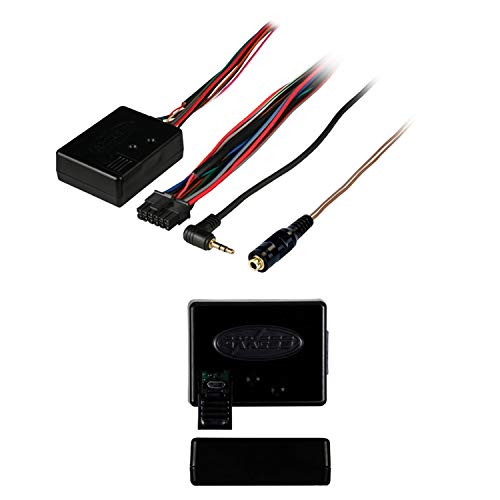
Metra Axxess ASWC-1 Steering Wheel Control Interface
- Pioneer Kenwood Eclipse no problem the ASWC-1 works with them all plus many more radio manufacturers.Micro “B” USB updatable
- Auto detects(*) the majority of vehicles on the market today and programs the steering wheel controls automatically
- Auto detects(*) what radio the ASWC-1 is connected to
Looking for a way to integrate your steering wheel controls with your new aftermarket stereo? The Metra Axxess ASWC-1 Steering Wheel Control Interface is the answer! 🎉 With universal compatibility, it auto-detects your vehicle type and radio connection. Enjoy dual assignments for your steering wheel buttons and speed-dependent volume control on select vehicles.
Key Features:
- Dimensions: 8 x 3.2 x 2.5 inches
- Micro “B” USB for updates
- Customer rating: 4.2/5 stars
Though installation may pose challenges, tech support is readily available. So, get ready to rock those steering controls seamlessly! 🚗✨
Best For: Those looking to retain steering wheel controls while upgrading to an aftermarket stereo system.
Pros:
- Universal compatibility with all major radio brands for easy integration.
- Auto-detection feature simplifies setup by identifying vehicle type and radio connection.
- Excellent customer support available, even on weekends, to assist with installation challenges.
Cons:
- Installation can be challenging, with some users finding the instructions unclear.
- Some users experienced minor issues with initial recognition of head units, requiring resets.
- Slightly higher price compared to some competitors, which may be a consideration for budget-conscious buyers.
Factors to Consider When Choosing an Audio Interface With Volume Control
When you’re picking an audio interface with volume control, there are several factors you should keep in mind. Think about connectivity options, audio quality standards, and how user-friendly the controls are. Plus, consider its size and compatibility with your devices—after all, you want something that fits your setup like a glove! 🎧
Connectivity Options Available
Next, consider multiple audio sources. If you connect various microphones, instruments, or devices at once, you won’t waste time switching cables. USB connectivity is also essential for that simple plug-and-play magic!
Don’t forget about dedicated headphone outputs, too. Having independent volume control means you can monitor your audio in real-time. Finally, look for balanced and unbalanced outputs to reduce noise interference. Happy hunting! 🎉
Audio Quality Standards
You might think connecting multiple devices is the hardest part of finding the perfect audio interface, but understanding audio quality standards is where the real magic happens! 🎶 When choosing an interface, focus on the sampling rates and bit depth. A studio-quality standard is 24-bit/96 kHz for high fidelity.
Look for a low total harmonic distortion (THD) below 0.01% to retain signal integrity. A higher dynamic range, measured in decibels (dB), lets you enjoy the softest whispers and roaring crescendos without distortion. Also, aim for a signal-to-noise ratio (SNR) greater than 100 dB to minimize background noise. Finally, high-quality analog-to-digital (ADC) and digital-to-analog converters (DAC) are key for clear and accurate audio reproduction. 🎧
User-Friendly Controls
How can you guarantee your audio interface enhances your recording experience? You’ll want user-friendly controls that make your life easier! Look for large rotary knobs or sliders for precise volume adjustments—no more fumbling in the heat of the moment! Quick-access buttons for muting or monitoring can streamline your workflow, too. A visual display that highlights current settings provides that extra clarity you need. Don’t underestimate customizable controls; assign your favorite functions for fast access. Finally, intuitive layouts with clear labels can save you setup time, perfect for beginners. Remember, the right interface isn’t just about sound; it’s about making your audio journey as smooth as possible! 🎶
Size and Portability
When choosing an audio interface, size and portability can make a world of difference! If you’re working in a compact studio, dimensions matter. Larger units take up valuable desk space, while smaller, lightweight devices are perfect for gigs or travel. Why lug around a heavyweight when you could slide a sleek interface into your bag?
Don’t forget to check the layout too! Interfaces with larger volume knobs or clearly marked controls will save you from fumbling in tight spaces. Plus, a well-designed interface integrates seamlessly into your workspace, helping keep your setup organized. Make sure your gear works as hard as you do—because sound shouldn’t come with a side of clutter! 🎧
Compatibility With Devices
Choosing an audio interface can feel overwhelming, especially with so many options available! You’ll want to make sure it’s compatible with your operating system, whether it’s Windows or MacOS. Next, check for connectivity options—those USB-C ports and XLR inputs are essential for your gear!
Aim for interfaces that are plug-and-play; nobody wants a tech headache! 🎧 You should also verify that it can manage multiple audio sources, making life easier if you’re recording or streaming.
Lastly, don’t forget audio quality standards! Look for at least 16-bit/48 kHz for peak sound performance. With these factors in mind, you’ll find the perfect audio interface that fits your setup like a glove! 🎵
Frequently Asked Questions
What Is the Importance of Volume Control in Audio Interfaces?
Volume control in audio interfaces isn’t just a nice-to-have; it’s essential! You want to tailor your listening experience, right? With precise volume control, you can prevent distortion, ensuring clarity in your sound. Plus, it helps you manage levels when recording or mixing, making your workflow smoother. Whether you’re jamming with friends or crafting your magnum opus, that fine-tuning ability keeps you in the zone, making every note count! 🎵
Can I Use These Interfaces With Gaming Consoles?
“When it rains, it pours,” but don’t worry, you can use those audio interfaces with gaming consoles! Many interfaces are compatible with systems like PlayStation and Xbox, assuming you have the right adapters. These interfaces can enhance sound quality, giving you that edge in gaming. Just check if the interface supports USB or optical connections. When you get it right, your gaming experience will soar to new levels! 🎮💥
How Do Audio Interfaces Improve Sound Quality?
Audio interfaces boost sound quality by converting analog signals to digital with precision. You get cleaner recordings and better playback. Here’s how they work:
- Higher Bit Depth: They capture more detail.
- Sample Rates: Higher rates result in smoother sounds.
- Dedicated Preamps: They amplify your signals without noise.
Using an audio interface means less distortion and more clarity, which means your music sounds awesome! 🎶 So, plug in and enjoy that rich sound!
Is Phantom Power Necessary for All Microphone Types?
Phantom power is like magic—it’s not for every microphone! If you’re using condenser mics, you definitely need it. These mics rely on phantom power to capture those subtle tones. However, dynamic mics? You can skip the juice! They thrive without it. So, before you plug in, check your mic type! Remember, giving the right power can transform your recordings from flat to fantastic! 🎤✨
Are These Audio Interfaces Compatible With Various Operating Systems?
Most audio interfaces are designed to be compatible across various operating systems like Windows, macOS, and even Linux. Just check the manufacturer’s specs before purchasing. For instance, interfaces often come with drivers for easier installation. Some may even support USB-C for modern devices! 🎉 So, whether you’re a Mac fan or a Windows wizard, you’ll find something that sings your tune. Just don’t forget to have those cables on hand! 😉


